+44
2039 362224
+44
2039 362224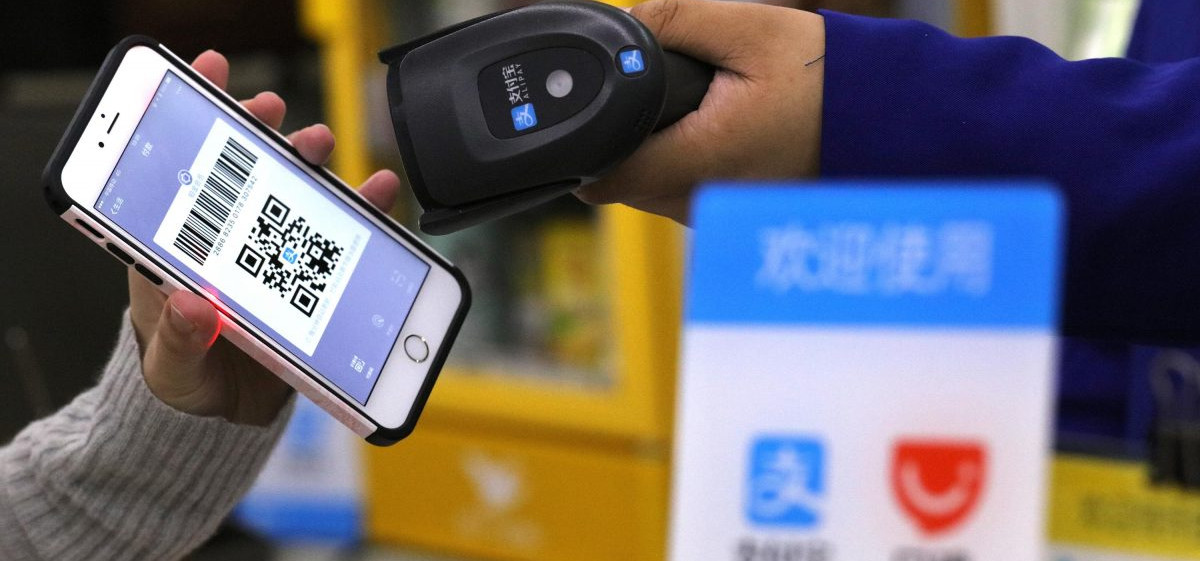
As China rapidly moves toward a cashless economy, mobile payment platforms like Alipay have become a vital part of daily life. From street vendors to luxury malls, almost every transaction is conducted through QR codes. For foreigners, setting up Alipay is no longer optional—it’s a necessity for convenience, accessibility, and independence while traveling or living in China.
This blog will guide you through everything you need to know about registration to advanced usage, ensuring a smooth and secure experience.
Why Foreigners Should Use Alipay
Alipay provides several kinds of services beyond simple payments, including
QR code payments at shops, restaurants, and taxis
Online shopping and bill payments
Booking transportation (buses, ride-hailing, metro)
Travel services
Hotel services
Peer-to-peer money transfers
Now that Alipay is more accessible to foreigners, it offers an international card and simplified verification.
Step-by-Step Registration Process
1. Download the Alipay app.
Install the app from your device’s official app store. Ensure you download the latest version for full access to international features.
2. Open Your Account
Install and open the app, then tap “Sign Up.”
You can register through:
Your international phone number
Your email address
A one-time verification code (OTP) will be sent to confirm your identity.
3. Set Up Security Credentials
You will need to create:
Login Password – asked for account access
Payment PIN (Password)—asked during transactions
Note: Use a secure, unique password to protect your account.
4. Complete Identity Verification (KYC)
Verification is mandatory to unlock full functionality.
Steps:
Go to “Me” → “Identity Verification”
Tap “Verify Now."
Select your country/region.
Choose document type (a passport is recommended)
5. Provide personal details.
Give accurate details exactly as shown on your passport:
Passport number
Full name
Nationality
Any mismatch will lead to rejection or delays.
6. Submit Documents and Facial Recognition:
You will be asked to:
Submit a clear and visible passport photo.
Perform a selfie or facial scan.
Note: Upload high-quality images with good lighting and avoid blurry images.
7. Approval Time
The verification process may take:
Only a few minutes (instant approval)
Up to 24 hours (manual review cases)
You will get a notification once approved.
Please watch the video given to learn more: Adding a Payment Method
After verification, you can start linking payment options.
Option 1: International Bank Card
Alipay supports major global cards, such as the following:
Visa
Mastercard
JCB
Notes: Some transactions may have small foreign exchange fees.
Not all merchants accept international cards via Alipay.
Option 2: Chinese Bank Account
If you have a local bank account, linking it provides:
Full functionality
Low fees
High transaction limits
Option 3: Tour Pass (For Short-Term Visitors)
The tour pass is mainly designed for foreigners who do not have a Chinese bank account.
Features include:
Prepaid wallet
Valid for a limited period (mainly 90 days)
Reloadable balance
It's ideal for short stays and travel.
Know about the Fees and Limits
Foreigners must be aware of the following:
Small transaction fees for international cards
Currency conversion charges
Daily and annual transaction limits depend on the verification level.
Note: Check the fee structure in the app daily, as policies may change.
Common Problems and Solutions
Verification Failed
Ensure details match your passport exactly
Re-upload clearer images
Card Not Accepted
Try a different international card
Ensure your bank allows international transactions
App Language Barrier
Switch to English in settings
Use in-app translation features if needed
Must follow the safety and security tips.
Do not share your payment password with anyone.
Always use biometric authentication (i.e., fingerprint or face ID).
Monitor transactions daily.
Log out when using shared devices.
The Alipay app has advanced encryption and fraud-detection systems, but user vigilance remains important.
Practical Uses of Alipay in China
Once set up, you can use Alipay for the following:
Paying in restaurants and street markets
Booking taxis and ride services
Using public transportation QR codes
Shopping online and offline
Sending money to friends (if supported)
Pro Tips for First-Time Users
Always carry a backup payment method (card or cash)
Screenshot your QR code in case there are connectivity issues
Use the “Scan” feature—it’s the most common payment method
Explore the “Mini Programs” inside Alipay for services like food delivery and travel
Alipay for Business and International Travelers
The use of Alipay is not limited to common transactions and can be used by foreign visitors to China for business needs. The international travelers can use the platform for a variety of routine costs such as food expenses, transport, shopping, hotel services, and certain types of travel. It is also possible for business visitors to use QR payments when making payments to local suppliers, restaurant operators, transportation companies, and other participating merchants. Nonetheless, the services that can be provided to the foreign user by Alipay will depend on the account verification level, payment method used, user location, merchant, and other Alipay regulations. Being in possession of the Alipay account does not automatically guarantee the possibility to use all the services of the platform by the international user. Certain services might need additional verification or even a Chinese bank account to operate. To make sure that everything will work properly, it is reasonable to test the card associated with the account with the small transaction. The other means of payment should be accessible for international travelers as well, especially in case of traveling out of big cities.
Using Alipay Without a Chinese Bank Account
One of the main benefits of Alipay for foreigners is the possibility of using the payment functionality of the service regardless of whether the user has a Chinese bank account or not. In case the international user meets all the criteria set by the company, he or she might be able to link an international payment card and pay for goods and services using Alipay. It might be easier for foreigners to manage money because of such an option since they do not have to carry a big amount of cash. Nonetheless, the international-card functionality does not work for all merchants, kinds of transactions, or services of Alipay. The users from other countries should be aware of the fact that some of the features provided by Alipay are meant for those who have financial accounts in China. Certain operations, financial products, and services may require some additional criteria for being eligible for the use of them. Thus, travelers should not think that linking their cards gives them the same level of accessibility as Chinese bank accounts.
Alipay Transportation and Travel Features
Alipay can make transport and travel much easier for foreigners in China. It is possible to use transport-related services via the application depending on the city and availability of current services, which may include subway or bus services, ride-hailing services, taxi payments, and selected travel services. Travelers can also use the mini programs of Alipay that will help them access local transport and other services. This will decrease the necessity to download a few applications to meet their basic travel needs. Prior to using any of the transportation services, travelers have to complete the verification of the account and payment setup. Additional permissions, registration, or local setup may be required to use some transport features. Travelers have to have mobile internet access since QR codes, electronic tickets, and confirmations of the services may be based on it. It is good to know how the relevant transportation service works before going into a crowded station or getting on the transport. It may be advisable to keep another way of payment as well. In case the phone battery, internet, or the service itself is unavailable for some reason, this can save travelers from troubles.
Managing Your Alipay Account Safely
It is necessary to ensure personal account security in case Alipay is linked to an international bank card. One should protect his login and payment passwords, as well as any kinds of verification codes, and must not share them with some stranger who offers help with a technical problem or a payment issue. Fingerprint or facial identification will serve as an extra measure in case it is available on a smartphone. It is also recommended to monitor all transactions and account activity in order to detect any unusual payments. Foreign tourists need to be especially cautious while using unknown QR codes. While the usage of QR-code payments can be comfortable, it is recommended to make sure of the name of the merchant and the payment amount before confirming the transaction. It is not recommended to approve some payment just because someone tells you to scan the code. In case of any suspicious transaction, one needs to examine the record and get in touch with the appropriate payment provider or bank.
What to Do When Alipay Stops Working
In some cases, an account of a foreigner may encounter payment errors, verification requests, card limitations, or temporary blocking. This does not mean that the account is permanently blocked; it might happen due to inaccurate personal information, card limitations, security measures, transaction limit violations, connection issues, or service unavailability. It is necessary to examine the particular error message appearing in the application and make sure that the linked means of payment is still active. In case of an international card rejection, one can contact the bank in order to make sure that such operations as overseas, online, and mobile wallet purchases are available. In case of any identity verification issues, one should double-check whether the provided data is correct according to the identification document. Account-related troubles require contacting only authorized representatives of Alipay customer support instead of third parties or websites claiming their ability to unlock accounts. Having a backup means of payment is especially crucial for travelers since there is always a possibility that the issue will take some time to fix.
Preparing Alipay Before Traveling to China
Tourists can avoid many payment issues in China if they prepare Alipay in advance. They may download the official app, register using an existing phone number, complete all available identity verification, and add an appropriate international payment card. At the same time, it is essential to make sure that international transactions are allowed by card-issuing banks and there are enough funds in the account. It is just as important to prepare for the situation when digital payment is not accessible. Tourists have to carry an additional payment instrument and have their smartphones charged during the day since it is necessary to charge their phones in case of loss of access to digital payments, transportation, and booking. Additionally, foreigners need to have available offline all important information about the trip. Before traveling to China, users can check their Alipay and learn how to use it, for example, to scan a QR code and check transactions. Thus, tourists will get ready to use both Alipay and another payment method and benefit from the digital payment system in China.
Final Thoughts
Setting up Alipay as a foreigner has become significantly easier in recent years. With proper verification and a linked payment method, you gain access to one of the most advanced digital payment ecosystems in the world.
Whether you’re traveling, studying, or working in China, Alipay ensures fast, secure, and widely accepted transactions—making your daily life far more convenient.
Click to get in touch with us to receive a customized quote.
#alipay #alipayguide #alipayforforeigners #chinapayments #ewalletchina #mobilepayments #digitalwallet #alipaysetup #travelchina #alipayregistration #chinamoney #paymentapps